Configure Amazon Workspaces MFA
Amazon Workspaces must be configured for MFA. During this task we will update Amazon WS directory configuration to enable MFA.
Before you begin
Ensure that you have the common UDP Port and Secret key values available
Configure AWS MFA
CAUTION:
DUO MFA with Push/SMS/Call is not supported for Amazon Workspaces with RADIUS. When an end user, enrolled in Okta with DUO MFA, attempts to access Amazon Workspaces configured with RADIUS, they must provide the six digit MFA passcode displayed on the DUO mobile app in addition to their primary password.
- Return to the browser open to the Amazon Workspace.
-
Open the directory configuration.
-
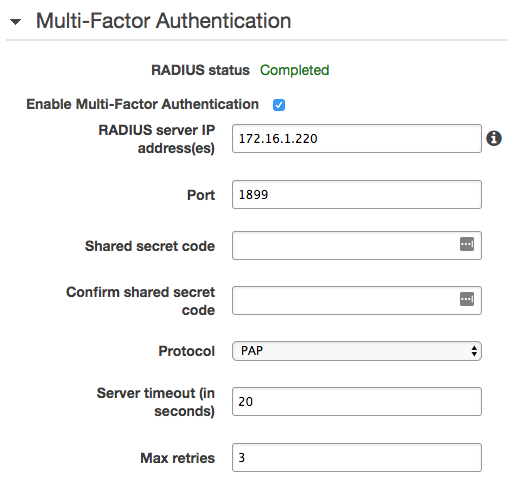
Select enable Multi-Factor authentication.
-
Specify the following values:
Field Value RADIUS Server IP Instance B's private IP address Port 1899 Shared Secret Value used when installing the Okta RADIUS agent. Protocol PAP - Save the updated configuration. When complete the updates should resemble: